Goraco Keynote Template: A Practical Review of Its Design, Flexibility, and Real-World Value
When you are preparing a presentation for a client pitch, a product launch, or an internal training session, the quality of your slide deck can directly influence how your message is received. A well-designed template saves hours of work and ensures visual consistency, but not every template delivers on its promises. Goraco - Keynote Template is one of those offerings that deserves a closer look, especially if you regularly work with Apple’s Keynote application and need a reliable, versatile foundation for your slides.
This template positions itself as a comprehensive solution for professionals who want polished presentations without starting from scratch. But does it hold up under real-world use? Let’s walk through its features, strengths, limitations, and the types of users who will benefit most from it.
What Goraco – Keynote Template Offers Out of the Box
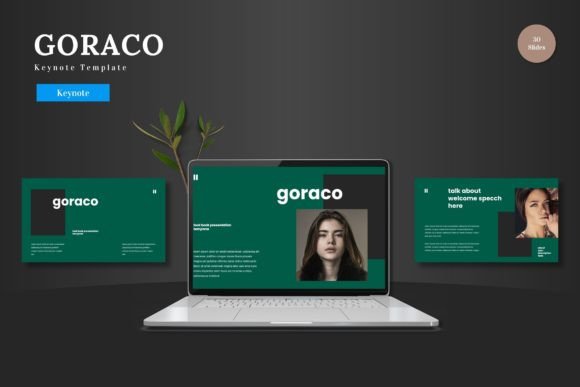
Goraco is not a single slide deck but a collection of five complete color variations, each containing 30 slides, for a total of 150 slides. The package includes section break slides, handcrafted infographics, gallery and portfolio layouts, and master-slide-based formatting. Everything is built around pixel-perfect illustrations that remain editable, and picture placeholders allow drag-and-drop image replacement.
The template is organized around five premade color schemes, meaning you can switch the entire look of your presentation in seconds without manually adjusting every element. The inclusion of master slides is particularly important for maintaining consistency across long decks, and the fact that all graphics are resizable and editable gives you control over the final output rather than locking you into a fixed design.
Key Structural Details
- Total slides: 150, split evenly across five color variations (30 slides each)
- Slide types: Title slides, content layouts, section breaks, infographics, image galleries, portfolio pages
- Customization: Master-slide-based editing, editable graphics, resizable elements, picture placeholders
- File contents: Five Keynote files, a Readme First document, font information, and photo credits
This structure makes Goraco suitable for projects that require multiple presentations with different branding or aesthetic needs. Instead of buying five separate templates, you get one flexible system that adapts to different contexts.
Visual Cohesion Across 150 Slides
The most immediate strength of this template is the consistency it enforces. When you rely on master slides, every slide inherits the same typography, color palette, and spacing rules. This eliminates the common problem of slides feeling disconnected or mismatched, especially when multiple people contribute to the same deck. In practice, this means you can hand a Goraco-based template to a colleague and trust that their slides will blend seamlessly with yours.
Five Color Variations Without Redundant Work
Having five premade color schemes is not just cosmetic. If you present to different clients or departments, you can repurpose the same content structure while changing the color scheme to match brand guidelines or audience expectations. For example, a creative agency might use the vibrant palette for a pitch to a fashion brand and the muted scheme for a corporate client, all while keeping the same layout and infographics. This saves significant rework time and reduces the risk of formatting errors.
Editable Graphics and Infographics
Many templates use static images that cannot be modified, which limits how you can tailor the message. Goraco’s graphics are vector-based and editable within Keynote. This means you can change the color of an icon, resize an illustration without quality loss, or adapt an infographic to display your own data. The handcrafted infographics are particularly useful for presenting statistics, timelines, or process flows in a visually engaging way that does not rely on default chart styles.
Drag-and-Drop Image Placeholders
If you regularly work with photography, screenshots, or product images, the picture placeholders are a genuine time-saver. Instead of cropping and positioning each image manually, you simply drag a file into the placeholder, and the template handles the framing. This is especially valuable for portfolio presentations, gallery slides, or case study formats where multiple images need to appear consistently sized and aligned.
Where Goraco May Fall Short for Some Users
No template is perfect for every scenario, and Goraco has a few characteristics that potential buyers should consider before purchasing.
Keynote-Only Compatibility
This template is built exclusively for Apple Keynote. If your workflow requires PowerPoint, Google Slides, or any other presentation software, you will need to convert the files, and the conversion process may break master slides, custom fonts, or advanced formatting. For users who are firmly in the Keynote ecosystem, this is not a limitation, but hybrid teams or organizations that use multiple platforms may find it restrictive.
Learning Curve with Master Slides
While master slides are powerful, they require a basic understanding of how Keynote’s theming system works. Users who are accustomed to editing each slide individually may initially find the master-slide approach unintuitive. The template does include a Readme First document with font and photo information, but it does not provide a detailed tutorial on editing masters. If you are new to Keynote, plan to spend a short time familiarizing yourself with the slide master view before you start customizing.
30 Slides per Theme May Feel Limited for Large Projects
For a standard business presentation, 30 slides per color scheme is generous, but if you are building a very large deck—say, a comprehensive annual report or an in-depth training module—you may need to duplicate slides or create additional layouts. The template gives you a strong starting point, but it is not an infinite library. You will likely need to reuse and adapt slides for longer presentations.
Who Benefits Most from Goraco – Keynote Template
Understanding your own workflow and audience is the best way to decide whether this template fits your needs.
Professionals and Entrepreneurs
If you are a business owner, consultant, or executive who delivers regular pitches, quarterly reviews, or strategy presentations, Goraco provides a professional baseline that builds trust with your audience. The consistent design signals attention to detail, and the ability to switch color schemes for different stakeholders helps you tailor the tone without rebuilding the deck.
Marketers and Creatives
For marketing professionals, the infographics and gallery slides are particularly relevant. You can present campaign results with custom data visualizations, showcase portfolio work with clean image layouts, or create media kits that look polished and intentional. The editable graphics allow you to adapt visuals to match campaign themes or seasonal branding without needing a designer.
Educators and Trainers
Teachers, trainers, and workshop facilitators who use Keynote can benefit from the section break slides and structured content layouts. Dividing a long presentation into clear sections with visual breaks helps learners follow along and retain information. The clean typography and uncluttered layouts also make slides readable on projectors and screens of varying quality.
Freelancers and Small Business Owners
If you work alone or with a small team, investing time in building a custom presentation theme from scratch is rarely practical. Goraco gives you a ready-to-use system that looks custom without the hours of design work. You can reuse it across multiple projects, update it with new content, and maintain a consistent visual identity even if your brand evolves over time.
Practical Recommendations for Getting the Most Out of This Template
To maximize the value of Goraco, approach it as a framework rather than a finished product. Start by choosing the color scheme that best matches your brand or the tone of your specific presentation. Then, use the master slides to replace placeholder text and images with your own content. Take advantage of the infographic layouts to present data in a way that supports your narrative rather than just decorating your slides.
If you plan to use the template for multiple clients or departments, create a copy of each color scheme file and rename it before editing. This keeps your original templates clean and reusable. Also, check the font information included in the package. If you do not have the recommended fonts installed, substitute them with ones that match your brand guidelines to avoid formatting issues when sharing the file.
One realistic limitation to keep in mind: because the template relies on master slides, any changes you make to the master will affect all slides using that layout. This is useful for global edits, but it means you should finalize your master modifications before you start customizing individual slides. Otherwise, you may have to reapply formatting after a master change.
Long-Term Value and Reliability
Goraco’s real value lies in its reusability. Unlike a one-off presentation design service, this template can be applied to dozens of projects over months or years. The five color schemes give it enough versatility to grow with your brand, and the editable nature of the graphics means it will not become obsolete as your content needs change.
The template is also well-suited for teams. If you work in an environment where multiple people prepare presentations, having a standardized template reduces inconsistencies and saves everyone time. The master-slide structure enforces design rules without requiring each user to understand design principles, which is a practical advantage in fast-moving organizations.
That said, the template is only as good as the effort you put into customizing it. Dropping content into the default slides without adjusting colors, fonts, or images to fit your specific message will result in a presentation that looks generic. The best outcomes come from treating Goraco as a starting point that you tailor to your audience, not as a shortcut that does all the work for you.
For anyone who uses Keynote regularly and wants to elevate the quality of their presentations without spending excessive time on layout and formatting, Goraco – Keynote Template is a solid investment. It delivers on its promise of visual cohesion, flexibility, and ease of use, provided you are comfortable working within the Keynote environment and are willing to invest a small amount of upfront time learning how master slides function. For the right user, it removes the friction of slide design and lets you focus on what actually matters: the content and the story you are telling.