Lacosata Keynote Template: A Complete Design System for Professional Presentations
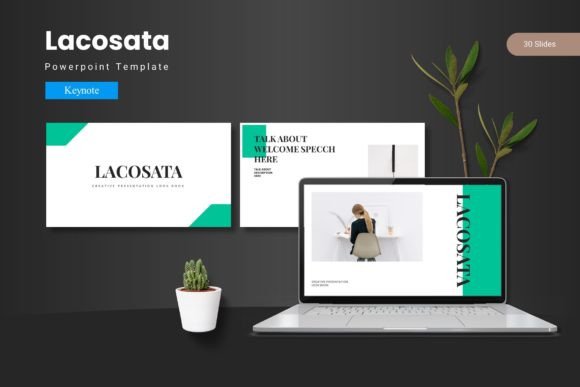
Creating a presentation that holds attention and communicates clearly is no small task. The slides need to look polished, but the content must also flow logically. Many presenters struggle with balancing visual appeal with practical structure. That is where a well-constructed template becomes essential. The Lacosata - Keynote Template offers a complete design system that addresses both aesthetics and functionality. It is built for professionals who need to deliver impactful presentations without spending hours on formatting. Instead of piecing together mismatched slides, you get a cohesive toolkit that works from the first slide to the last.
Why Cohesive Design Matters in Modern Presentations
Audiences today are visually sophisticated. They have seen countless slide decks, and they can tell when a presentation feels disjointed. A mismatched color palette or inconsistent typography can distract from your message. The Lacosata - Keynote Template eliminates this problem by offering a unified visual language across all 150 slides. Whether you are presenting quarterly results, pitching a new product, or leading a workshop, consistency builds credibility. When every slide feels like part of the same story, your audience can focus on the content rather than the design quirks.
This template goes beyond basic consistency. It provides five distinct color variations, each applied across the entire deck. You can choose a scheme that aligns with your brand or the tone of your presentation. A financial report might call for a restrained, professional palette, while a creative pitch benefits from something bolder. Having five options baked into the structure means you are never stuck with a color that feels off. You simply pick the variation that fits and move forward.
Exploring the Scope: 150 Slides Across Five Color Schemes
One of the first things you notice about the Lacosata - Keynote Template is its sheer breadth. The package includes 150 total slides, divided into 30 slides per color variation. This is not a small collection of basic layouts. Each set includes section break slides, content slides, gallery pages, portfolio layouts, and infographic templates. You have enough material to build a lengthy presentation or to pick and choose the exact slides you need for a shorter deck.
The section break slides deserve special mention. In longer presentations, transitions between topics can feel abrupt. A well-designed section break gives the audience a moment to reset and signals that a new segment is beginning. These slides are visually distinct but still fit within the overall design system. They help structure your narrative without breaking the visual flow. If you have ever sat through a presentation where the speaker jumped between unrelated slides, you know how valuable this structural clarity can be.
Built on Master Slides: Efficiency Without Sacrificing Flexibility
A common frustration with presentation templates is that they look good in the preview but become difficult to edit in practice. Elements might be locked in place, or changing one slide forces you to update every other slide manually. The Lacosata - Keynote Template is built on Master Slides, which solves this problem elegantly. Master Slides allow you to make global changes to fonts, colors, or layout elements that then propagate across the entire deck. If you decide halfway through that your headings need to be a bit larger, you adjust the Master Slide, and the change applies everywhere.
This approach saves time and reduces errors. You are not hunting through 150 slides to make the same edit repeatedly. It also means that the template remains consistent even as you customize it. For teams working on presentations together, this is especially valuable. One person can set the master styles, and everyone else can focus on content without worrying about breaking the design.
Handcrafted Infographics and Pixel-Perfect Illustrations
Data is a central part of many presentations, but raw numbers rarely engage an audience on their own. The Lacosata - Keynote Template includes handcrafted infographic elements that help you visualize information clearly. These are not generic charts that require extensive tweaking. The infographics are designed to be resizable and editable, so you can adapt them to your specific data points. Whether you need to show a process flow, compare metrics, or illustrate a timeline, there is a layout that supports it.
The illustrations throughout the template are described as pixel-perfect, which means they hold up well at different sizes and on various screen resolutions. This matters because presentations are often projected onto large screens where any imperfection becomes glaringly obvious. Crisp, clean graphics contribute to a professional impression. They also communicate that you have put care into your materials, which subtly reinforces the authority of your message.
Picture Placeholders and Drag-and-Drop Simplicity
Images are powerful in presentations, but inserting them can be awkward if the layout is rigid. The Lacosata - Keynote Template includes picture placeholders that are designed for drag-and-drop functionality. You simply drop your image into the placeholder, and it automatically scales and crops to fit the designated area. This eliminates the need to manually resize images or worry about alignment. It also means you can swap images quickly if you are testing different visuals or if your content changes at the last minute.
For professionals who prepare presentations under tight deadlines, this feature alone can save significant time. Instead of wrestling with image formatting, you can focus on selecting the right photos and ensuring they support your narrative. The gallery and portfolio slides are particularly well-suited for creative fields where visual assets are central to the presentation. Photographers, designers, architects, and marketers will find these layouts immediately useful.
Practical Applications Across Industries and Scenarios
The versatility of the Lacosata - Keynote Template makes it suitable for a wide range of contexts. In corporate environments, the clean structure and multiple color schemes allow you to align the deck with brand guidelines without starting from scratch. You can use the infographics for quarterly reports, the section breaks for strategy overviews, and the portfolio slides for case studies. The template adapts to the material rather than forcing the material into a rigid container.
For entrepreneurs and startup founders, time is often scarce. A pitch deck needs to be polished, but you cannot spend days tweaking alignment and typography. This template provides a professional foundation that you can populate with your own content quickly. The five color variations also give you the option to test different looks depending on the investor or audience you are addressing. A more conservative investor might respond better to a muted palette, while a creative audience might appreciate a vibrant scheme. Having that choice without rebuilding the deck is a practical advantage.
Educators and trainers can also benefit. Presentation-heavy roles like teaching or corporate training require decks that are clear, organized, and visually engaging. The section breaks help structure modules, and the infographics make complex concepts easier to grasp. The drag-and-drop image placeholders simplify adding diagrams, screenshots, or student work. When your materials are easy to update, you are more likely to keep them current.
Font, Color, and Customization Considerations
When choosing a presentation template, attention to typography and color is important. The Lacosata - Keynote Template includes font and photo information in the main file, along with a readme file that guides you through setup. This transparency is helpful if you need to source fonts for licensing reasons or if you want to understand how the template was constructed. Being able to customize fonts and colors effortlessly is a stated feature, and the Master Slide structure makes that practical.
One consideration for potential users is that the template is designed specifically for Keynote. If your workflow is built around PowerPoint or Google Slides, you would need to convert the file, which could introduce formatting inconsistencies. For Keynote users, however, the template leverages the software's strengths fully. The drag-and-drop picture placeholders, Master Slides, and color variations all work natively, which means fewer compatibility headaches.
Another factor to consider is the learning curve. While the template is designed to be straightforward, users who are new to Keynote's Master Slide system might need a few minutes to understand how changes propagate. The included readme file addresses this, and once you understand the logic, the efficiency gains are substantial. For experienced Keynote users, the template will feel intuitive from the start.
Observations on Presentation Quality and Lasting Impressions
Ultimately, a presentation template is a tool for communication. The Lacosata - Keynote Template succeeds because it reduces friction between your ideas and the audience's understanding. The layouts are structured to guide the eye naturally, the infographics simplify complexity, and the consistent design reinforces your message. When you are not distracted by formatting decisions, you can focus on delivery and content quality.
Leaving a lasting mark with each slide means that every element serves a purpose. The gallery slides allow you to showcase work without clutter. The section breaks give your narrative room to breathe. The color variations let you match the mood of your presentation. These may seem like small details, but they add up to a professional experience that audiences notice. Whether you are presenting to a boardroom, a conference hall, or a classroom, the visual coherence of your deck supports your credibility.
Final Practical Recommendations
If you are considering the Lacosata - Keynote Template, start by reviewing the five color schemes to find the one that best matches your brand or presentation tone. Spend a few minutes exploring the Master Slides to understand how fonts and colors are structured. This upfront investment will pay off when you need to make bulk changes later. Use the picture placeholders for your key visuals and take advantage of the infographic layouts for any data-heavy slides. The gallery and portfolio pages are ideal for showcasing products, projects, or team members.
For recurring presentations, consider saving your customized version of the template as a starting point. That way, you maintain the design consistency across multiple decks without rebuilding from scratch each time. The template is robust enough to handle frequent use, and the editable elements mean you can refresh it as your brand evolves.
In a field where first impressions are formed quickly, having a reliable, well-designed presentation template is not just a convenience it is a strategic advantage. The Lacosata - Keynote Template provides the structure, variety, and polish that professionals need to communicate with confidence. Whether you are preparing a pitch, a report, or a portfolio, it gives you a foundation that lets your content take center stage.