Present with Impact: A Deep Dive into the Teraco PowerPoint Template
Why Visual Storytelling Matters in Modern Presentations
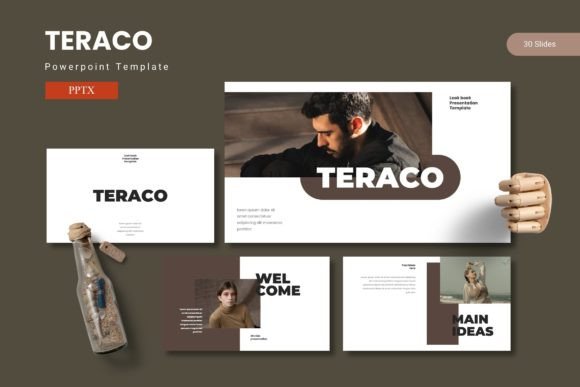
Whether you are pitching to investors, teaching a class, or reporting quarterly results, the medium through which you share your ideas often determines how well those ideas are received. A well-structured slide deck does more than display information—it guides the audience’s attention, reinforces key points, and creates an emotional connection with the content. The Teraco PowerPoint Template is designed specifically to help professionals, educators, and creators achieve that level of communication without spending hours on design. It combines a library of 150 total slides with pre-made color variations, drag-and-drop functionality, and handcrafted infographics, making it a versatile tool for almost any presentation scenario.
Core Features That Define the Teraco Kit
Before diving into use cases, it helps to understand what the Teraco package actually contains. The template is built around a master slide system, which means consistency across all slides is maintained automatically. Here are the key elements that set it apart:
- 150 Total Slides across five pre-made colors — Each color theme includes 30 slides, so you can switch the entire deck’s look with one click.
- Section break slides — These are designed to separate chapters of your presentation, giving the audience a natural pause and a sense of structure.
- Five color variations — The folder includes five distinct color schemes, which can be applied instantly to change the mood of the deck (corporate, creative, educational, etc.).
- Handcrafted infographics — Rather than generic icons, the infographics are built with pixel-perfect illustrations that remain editable and resizable.
- Picture placeholders with drag-and-drop — Instead of cutting and pasting images manually, you simply drop a photo into the placeholder, and the slide adjusts.
- Gallery and portfolio slide layouts — Ideal for showcasing work, teams, or product images in a clean grid format.
- Master slide control — Changes to fonts, colors, or backgrounds on the master slide instantly update every slide in the deck.
These features aren’t just a checklist—they work together to reduce friction during creation. For instance, the combination of master slides and pre-colored themes ensures that a user who knows nothing about color theory can still produce a harmonious presentation.
Understanding the Five-Color System and Slide Breakdown
A common frustration with presentation templates is that they look great in the demo but fall apart when you add real content. The Teraco approach mitigates this by offering five distinct color schemes within the same template. Each scheme contains 30 slides, meaning you have 150 slides in total, but you never need to use all of them. Instead, you pick the color that matches your brand or mood—blue for trust, green for growth, red for urgency, etc.—and then select only the slides you need from that set.
The five schemes are stored in separate files (five PPTX files), but they share identical layout structures. That means you can copy a slide from one scheme into another without breaking the design. This flexibility is especially valuable for agencies or consultants who prepare decks for different clients: you can reuse the same narrative structure while changing the look in seconds.
Business Professionals and Executives
For board meetings, sales pitches, or strategic planning sessions, the Teraco template provides a clean, data-friendly environment. The section break slides allow you to clearly delineate “Market Overview,” “Competitive Analysis,” and “Financial Projections.” The handcrafted infographics, such as circular diagrams, flowcharts, and comparison tables, help you present complex data without overwhelming the audience. Because the template is based on master slides, you can ensure that all charts and graphs are consistently styled with the same fonts and colors, which reinforces brand identity.
Educators and Researchers
Teachers and academic presenters often need to balance text-heavy slides with visuals. The Teraco gallery slide layouts are perfect for showing image sequences in a lab experiment, while the bullet-point slides can be adapted to present key findings. The five color schemes let you differentiate sections—for example, using one color for “Introduction,” another for “Methodology,” and a third for “Results.” This visual separation helps students follow the logical flow of a lecture. Additionally, the easily resizable graphics mean that an educator can scale down a diagram for a handout or zoom in for a specific explanation without losing clarity.
Creative Professionals and Designers
Portfolios, case studies, and creative proposals demand high visual impact. The Teraco template includes dedicated portfolio and gallery slides where you can drag and drop projects into a grid. Because the infographics are pixel-perfect and editable, you can customize icons to match your personal style. The five color variations also allow a designer to present a consistent body of work while subtly shifting the mood from one project to the next. For example, a branding portfolio might use the first color scheme to show identity work and the second to show packaging, creating a natural transition.
How Customizable Layouts Speed Up Workflows
One of the overlooked pain points in presentation creation is the amount of manual adjustment required when inserting images, graphs, or text boxes. Teraco addresses this with picture placeholders that automatically crop and position images. You simply drop a picture into the designated area, and the placeholder adjusts the composition—no more resizing, cropping, or alignment issues. Similarly, the master slide approach means that if you decide mid-way to change the background color or font, you update the master once and every slide follows. This is particularly useful when working in a team: the person who finishes the content can hand off a consistent deck to the reviewer without worrying about formatting inconsistencies.
Observations on Slide Count and Choice
Having 150 slides available might seem excessive, but in practice it allows you to choose only the layouts that match your content. A typical business deck might use 20-30 slides, while a training module could use 50-60. The advantage of a large library is that you aren’t forced to adapt your message to a rigidly small set of layouts. Need a timeline? There’s a slide for it. Need a quote slide with a photo background? It’s included. Need a comparison of three options? The template has multiple variations. This breadth reduces the temptation to reuse the same slide for different purposes, which often confuses the audience.
Considerations When Using Pre-Designed Templates
While the Teraco template provides a strong foundation, it’s important to tailor the content to your specific context. Overloading a slide with too many infographics can distract from the core message. A good practice is to use one strong visual per slide and let the text support it. Also, because the template includes five color schemes, you should choose one that aligns with your audience’s expectations—bright colors might work for an internal team meeting but could be too informal for a boardroom presentation. The template’s “Read Me First” file includes font and photo information, so be sure to install any required fonts before editing to avoid layout shifts.
Real-World Example: From Bullet Points to a Visual Story
Imagine you are an entrepreneur preparing a funding pitch. Your initial deck is text-heavy, with long paragraphs explaining the problem, solution, and market size. By switching to the Teraco template, you can take the same content and split it across multiple slides: a full-bleed image on the problem slide, a handcrafted chart for market data, a section break for the solution, and a gallery slide showing the product prototype. The five-color scheme allows you to use a bold accent color for key statistics, drawing the eye exactly where you want. Instead of spending an afternoon fighting with alignment, you can finish the deck in an hour and focus on practicing your delivery.
Adaptability Across Presentation Tools
The main file is provided in PPTX format, which works with Microsoft PowerPoint (2013 and later) and also imports into Google Slides and Keynote with some limitations. The master slide structure is preserved best in PowerPoint, but even after importing to another tool, the slide layouts remain mostly intact. This cross-platform usability makes Teraco a good choice for teams that collaborate across different operating systems.
Final Thoughts on the Teraco Approach
Presentation design is not just about making slides look pretty—it’s about building a framework that helps your audience absorb and remember your message. The Teraco PowerPoint Template achieves this by combining a generous slide count, editable infographics, and a straightforward color system. Whether you are a business owner, researcher, or creative, the template removes the technical barriers to visual storytelling. By letting you focus on content rather than formatting, it turns the often tedious task of deck building into a more enjoyable and efficient process. The real value lies not in the number of slides, but in the clarity and confidence that a consistent, polished presentation can bring to any speaker.