Teraco Google Slide Template: Versatile Presentations Made Simple
If you have ever stared at a blank slide, wondering how to turn an idea into something visually compelling, you know the weight of that moment. Presentation design is more than arranging text and images—it is about communicating clearly, leaving a lasting impression, and doing it all without wasting hours. The Teraco Google Slide Template offers a comprehensive solution: 150 total slides spread across five premade color schemes, built for Google Slides and PowerPoint. Whether you are a first-time presenter or a seasoned marketer, this toolkit aims to remove friction from the design process while giving you the flexibility to adapt each slide to your unique story.
What Makes the Teraco Template Stand Out?
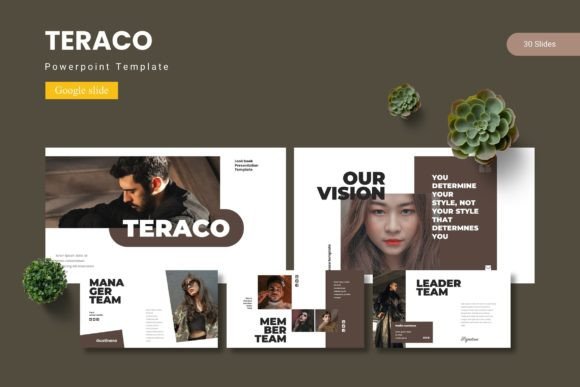
At its core, the Teraco template is a collection of handcrafted slides that cover a broad range of use cases. The 150 slides are divided into 30 slides per template, with five color variations included. This means you get a consistent visual language from start to finish. Master slide layouts ensure that any changes you make to the parent slide propagate across multiple slides, saving time and keeping alignment tight. Picture placeholders let you drag and drop your own images without breaking the layout, and the infographic elements are pixel-perfect and fully editable.
Section break slides help you mark transitions in your story—useful for longer decks like training modules or annual reports. Gallery and portfolio slides allow you to showcase work visually, while resizable vector graphics mean you can scale icons and illustrations without losing quality. The package includes five PPTX files and a Google Slides version, plus a readme file and font/photo information, so setup is straightforward. In short, the template prioritizes both structure and adaptability.
Beginners and Occasional Presenters
If you rarely create presentations—perhaps for a community group, a school project, or a small business pitch—the biggest hurdle is often getting started. The Teraco template removes that blank-page anxiety. With 150 pre-built slides, you can pick a layout, replace the placeholder text, and drop in your images. The drag-and-drop simplicity means you do not need graphic design skills. The five color schemes give you room to match your brand or mood without learning color theory. For example, a freelance photographer can use the portfolio slide to display six images in a grid, adjust the accent color from the default blue to a muted gray, and have a professional-looking portfolio in minutes. The master slide feature also helps beginners maintain consistency: change one font on the master, and every slide updates automatically.
Professionals and Marketers
For those who regularly pitch ideas, report data, or present to clients, efficiency and polish are non-negotiable. The Teraco template offers a balance of flexibility and speed. You can start with a clean, modern aesthetic and then customize it to match your organization’s branding. The infographic slides are particularly useful for visualizing metrics or processes without building charts from scratch. Marketers can take advantage of the gallery slides to showcase case studies or product shots, while section break slides help segment a presentation into clear chapters—ideal for a long sales deck or an agency credentials presentation.
A real-world example: a marketing manager preparing a quarterly review might use the 150 slides to assemble a narrative: title slide, agenda, highlight section breaks, infographic for KPI trends, gallery for campaign visuals, and a closing call-to-action. Because the template includes multiple variations of each slide type, the presenter can choose a layout that best fits the data, and the five color schemes ensure the deck stays fresh even when reused across different clients or seasons.
Educators and Trainers
Teaching requires clarity, repetition, and visual engagement. The Teraco template’s section break slides act as natural dividers between topics or lessons. Instructors can use the infographic slides to explain complex processes—like a cycle diagram for a science lesson or a timeline for history—without needing to design from scratch. The picture placeholders make it easy to insert diagrams, photos, or student work. Because the template is fully editable, educators can also simplify slides by removing elements or adding their own text boxes.
For example, a corporate trainer building a compliance module can rely on the consistent styling to keep learners focused on content rather than changing design. The five color schemes allow quick differentiation between modules (e.g., green for safety, blue for ethics). And since the template works in Google Slides, collaborators can work on the same deck simultaneously, which is handy for team-taught courses.
Entrepreneurs and Small Business Owners
When you are running a business, time is money. The Teraco template helps you create pitch decks, investor presentations, or product catalogs quickly. The 150 slides cover many common scenarios: title slides, about us, team, services, pricing tables, quotes, and contact slides. The gallery and portfolio slides are especially useful for showing work samples, while the infographic slides can turn a list of features into a compelling visual. Small business owners often need to stretch a small budget, so having a single template that works for multiple presentations—like a trade show booth slide show and a one-pager for a website—adds long-term value.
Cost-wise, buying a quality template like Teraco is far cheaper than hiring a designer or spending hours learning advanced design software. And because it includes both PowerPoint and Google Slides versions, you are not locked into one ecosystem. The readme file and font information also help avoid technical hiccups, which is critical when you are presenting to potential investors.
Balancing Flexibility and Structure
One of the greatest strengths of the Teraco template is that it does not force you into a rigid framework. You can keep the premade color scheme or swap colors entirely. Graphics are resizable and editable, so you can scale an icon down for a small footnote or stretch it across a full slide. The picture placeholders are exactly that—placeholders—so you can replace them with your own images, logos, or screenshots without distortion.
This flexibility matters differently depending on your priorities. A hobbyist creating a photo album for a family reunion might ignore the infographics entirely and focus on the gallery slides and text layouts. A PR professional, on the other hand, might need to maintain strict brand guidelines and will appreciate that the master slides let them set a custom color palette and font pair once. The template gives you a starting point that is both thorough and open to changes.
Is Teraco Right for Your Project?
To decide, consider your skill level, the project scope, and the impression you want to make. If you need a one-off presentation for a small audience and you have no design experience, the Teraco template is a safe, time-saving choice. If you regularly produce presentations and value consistency, the 150 slides and five color schemes let you reuse the template across months without repeating the same look.
For experienced designers who prefer to build from scratch for full creative control, the template might feel limiting. But even then, the source files are editable, so you could use the structure and replace elements with your own custom art. The template is also useful as a teaching tool for anyone learning presentation design: you can study how the infographics are constructed, how master slides work, and how color schemes influence tone.
Think about your most common presentation type. If it involves a lot of data or timelines, the infographic slides offer a head start. If you showcase many images, the gallery and portfolio slides are a clear win. If you often present to different audiences, the five color schemes help you adapt quickly. And if you collaborate with a team, the Google Slides integration allows real-time editing without file version conflicts.
Templates like Teraco sit at the intersection of convenience and quality. They do not replace your content or your voice, but they do provide a reliable visual foundation. For many users, that foundation is exactly what transforms a good presentation into a great one—without the extra hours of design work.