Oculox – Google Slide Template for Presentations That Actually Work
Presentations are everywhere. Sales decks, client pitches, internal training, portfolio reviews, conference talks. If you have ever sat through a poorly designed slide deck, you know how quickly attention drifts away. The design matters. Not just for aesthetics but for clarity and impact. That is exactly where Oculox comes in. This Google Slide template offers a clean, flexible structure for building presentations that feel professional without requiring a graphic design background. It is useful for anyone who needs to communicate ideas visually, quickly, and with confidence.
Oculox fits the way you actually work with slides
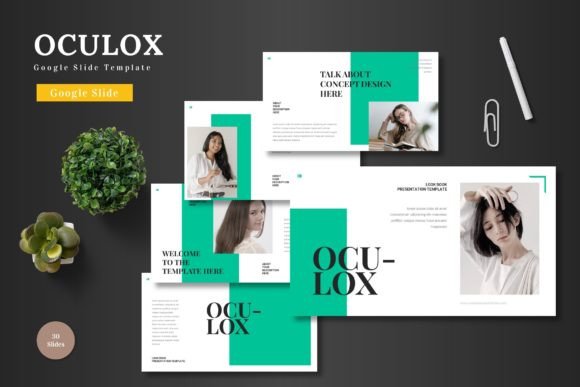
What makes Oculox stand out is not just the number of slides. It is how those slides work together across different contexts. With 150 total slides across five pre-made color schemes, you get a consistent visual language from start to finish. That matters more than most people realize. When you switch between slide decks for different projects, maintaining a cohesive look can become messy. Oculox solves that by giving you five complete color variations. Each variation contains 30 slides. So you can pick a palette that matches your brand or your mood, and use it across an entire presentation without manual tweaking.
If you work in marketing, you probably present campaign results regularly. With Oculox, you can pull data from analytics tools, drop screenshots or charts into picture placeholders, and let the template handle the layout. The section break slides help signal transitions, which is useful when you move from one part of your story to the next. That is a small detail, but it makes a big difference in keeping your audience oriented.
For freelancers and consultants who need to look polished fast
Freelancers often juggle multiple clients. Each client might have their own brand guidelines, visual preferences, or expectations. Oculox gives you flexibility without starting from scratch every time. You can take the same core template and remix it for different industries. For example, if you are a social media consultant pitching to a lifestyle brand one week and a logistics company the next, the color variations let you shift tone quickly. The deep blue palette might suit the logistics client. The warmer tones could match the lifestyle brand. You keep the same slide architecture. Only the colors change.
Something else that helps is the handcrafted infographics. If you are presenting survey results, market research, or comparative data, having ready-made infographic slides saves hours. You do not need to build charts from scratch or hunt for icons. The template includes graphics that you can resize, recolor, and edit directly in Google Slides. The picture placeholders support drag-and-drop. You drop your own images in, and the template adjusts. That is practical when you are working under a deadline and cannot afford to mess with formatting.
Internal teams and corporate communication
Large organizations often struggle with consistency across presentations. One team uses a blue theme, another uses green, and a third uses entirely different fonts. When executives review decks from multiple departments, the inconsistency can feel unprofessional. Oculox helps standardize without forcing everyone into the same rigid box. The five color schemes provide enough variety for different teams while keeping the overall structure familiar. The master slides ensure that any changes you make apply across all slides in your deck. So if you need to update a logo or adjust a footer, you do it once.
Corporate trainers also benefit. Training decks often contain a lot of text-heavy slides, which can overwhelm learners. With Oculox, you can break content into smaller chunks using the gallery and portfolio slides. Those layouts allow you to showcase examples, case studies, or team photos visually. Instead of listing bullet points about a successful project, you can use a portfolio slide to show the before and after, the key metrics, and the outcome. That makes learning more concrete.
Portfolios and creative showcases
If you are a designer, photographer, or creative professional, your portfolio is your most important selling tool. Oculox includes dedicated gallery and portfolio slides that let you display work without cluttered layouts. The pixel-perfect illustrations and resizable graphics mean your visuals remain sharp, even when projected on a large screen. When you present to potential clients, you want the focus on your work, not on awkward transitions or misaligned grids. The template handles the alignment so you can concentrate on telling the story behind each piece.
Another scenario is pitching to a creative director or agency. You might need to walk through your process from concept to final execution. The section break slides allow you to mark distinct phases in your presentation, making it easy for the audience to follow your narrative. The built-in infographics can also show workflow or timeline data, which is helpful when explaining how long a project took or how you solved a specific challenge.
Educators and non-profits with limited resources
Not everyone has a design budget. Teachers, researchers, and nonprofit staff often create presentations on top of their main responsibilities. They need something functional, not flashy. Oculox gives them a solid foundation. The 30-slide structure per color scheme covers most standard presentation needs, from title slides to conclusion slides. The picture placeholders make it easy to add photos from events, field research, or classroom activities. For grant proposals or donor presentations, having clean infographics can help you communicate impact numbers more clearly than a spreadsheet ever could.
One consideration is learning curve. If you are not familiar with master slides or how to customize Google Slide templates, Oculox might require a quick walkthrough. The readme file included in the folder explains the basics. But the template itself is built to be intuitive. The main file includes everything in one place, so you do not have to hunt for fonts or missing elements. The font and photo information is also provided, which saves time when you need to match external assets.
What to consider before choosing Oculox
Oculox works best for people who value structure and consistency. If you prefer highly experimental or unconventional slide designs, this template might feel too organized. But for most professional contexts, structured layouts perform better. Audiences appreciate clarity over cleverness.
Another consideration is color flexibility. You get five pre-made color schemes. That covers a wide range of uses, but if your brand uses a very specific color not included, you will need to customize it manually. The master slides make that easier than editing every slide individually, but it is still an extra step. For most users, one of the five schemes will match closely enough. The template uses Google Slides, so color adjustments are straightforward.
File compatibility is another point. The main file includes five PPTX items from Google Slides and the 30-slide Google Slide versions with five color variations. That means you can work in PowerPoint if needed, but the native Google Slide experience is smoother. If your organization relies heavily on PowerPoint, you can still use the PPTX files. Just check that all fonts and graphics carry over correctly. The readme file offers guidance on that.
Practical strengths worth highlighting
One strength that often goes unnoticed is how the template handles visual hierarchy. The designers clearly thought about how people scan slides. Key information stands out without shouting. Graphics support the message rather than distracting from it. That is harder to achieve than it looks. When you use Oculox, your slides look intentional. That builds trust with your audience, whether you are presenting to two people or two hundred.
The inclusion of picture placeholders is another practical win. Instead of manually cropping and resizing every image, you drag your photo into the designated area, and it fits. That might sound minor, but when you have fifteen images to insert for a gallery slide, it saves real time. The same applies to the infographic elements. They are not just decorative. They are designed to convey information efficiently, which matters when your audience has limited attention.
For anyone who has ever spent hours aligning text boxes or adjusting image sizes, Oculox removes that friction. You focus on your content. The template handles the layout.
Who benefits most from Oculox
Professionals who present often will get the most value. Sales teams pitching to prospects, consultants delivering recommendations, educators teaching complex topics, creatives showcasing portfolios, and nonprofit leaders communicating impact. The template scales across these contexts because it prioritizes clarity over decoration. It does not force a specific style. Instead, it provides a framework that you can adapt.
New presenters also benefit. If you are early in your career and want your presentations to look polished without hiring a designer, Oculox gives you a head start. You avoid common mistakes like cluttered slides, inconsistent fonts, or mismatched colors. The template guides you toward better visual communication without being prescriptive.
The five color variations also make it suitable for agencies or teams that handle multiple clients. You can assign different color schemes to different client projects, keeping everything organized inside the same template ecosystem. That reduces the overhead of maintaining separate template files for each brand.
Real-world example to bring it together
Imagine you are a business development manager preparing a quarterly review for your leadership team. You need to show revenue trends, project milestones, team achievements, and upcoming goals. With Oculox, you start with the blue color scheme. You use a title slide, then a section break for the revenue overview. You insert a bar chart into one of the infographic slides. For project milestones, you use a timeline layout. Team photos go into the gallery slides. The whole thing takes you less than an hour, and the final presentation looks like it was professionally produced. Your leadership team focuses on your numbers, not on the formatting. That is exactly what a good template should do.
Oculox is not just about having slides. It is about having slides that support your message instead of competing with it. For anyone who needs to present with confidence and clarity, that is the real value.