Gurino PowerPoint Template: A Strategic Tool for Clearer Communication and Stronger Presentations
Every presentation carries weight. Whether you are pitching to investors, training a team, presenting quarterly results, or launching a new product, the way you communicate your ideas can determine how they are received. The Gurino PowerPoint Template is designed to help you present those ideas with clarity and conviction. But more than just a set of slides, this template offers a framework for thinking about how you structure information, use visuals to reinforce your message, and maintain consistency across your narrative.
This article explores how to use Gurino strategically, not just as a design tool, but as a decision-making asset that supports your communication goals, brand positioning, and long-term credibility.
What Makes Gurino More Than a Typical Template
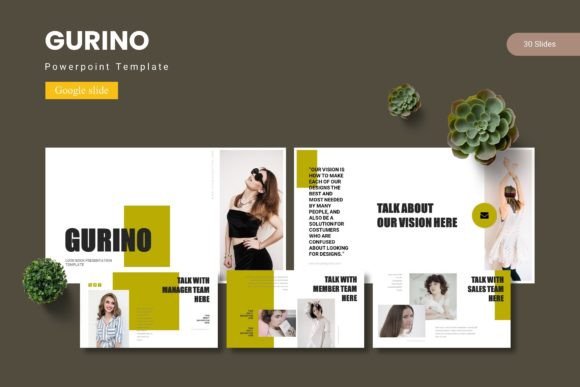
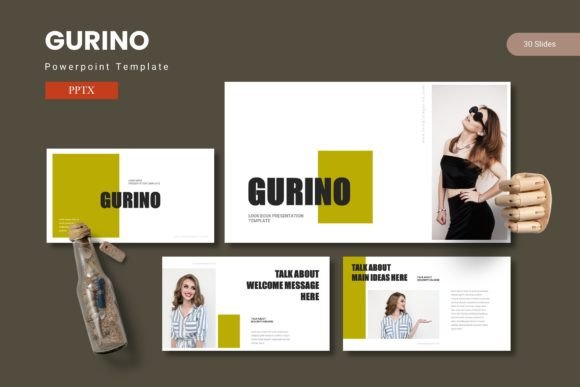
Most presentation templates offer a handful of slides with basic layouts. Gurino takes a different approach. With 150 total slides spread across 5 pre-made color variations, it provides a complete ecosystem for building presentations that feel cohesive and intentional. Each color variation includes 30 slides, plus dedicated section break slides, infographics, portfolio layouts, and image placeholders.
The template is built on master slides, meaning you can edit global elements like fonts, colors, and backgrounds without manually adjusting every slide. This is a practical advantage when you are under time pressure or iterating on feedback. The handcrafted infographics and pixel-perfect illustrations are fully resizable and editable, so you are not locked into a fixed design.
Strategically, this matters because consistency builds trust. When your audience sees a unified visual language across your slides, they spend less time processing design inconsistencies and more time absorbing your content. Gurino allows you to maintain that consistency without requiring advanced design skills.
The Role of Structure in Presentation Success
A common mistake professionals make is treating templates as a shortcut for content planning. Gurino can support your goals, but only if you approach it with intentionality. The template includes gallery and portfolio slides, section breaks, and picture placeholders with drag-and-drop functionality. These features are not just aesthetic conveniences; they are structural tools that help you organize your narrative.
Before you open PowerPoint, ask yourself: What is the core message I want my audience to remember? Once you have that clarity, you can map your content to the slide types Gurino offers. Use section breaks to transition between major themes. Use infographics to simplify complex data. Use portfolio slides to showcase case studies or results. Each slide type serves a specific communicative function.
How Gurino Supports Your Planning and Positioning Goals
If you are a marketer, entrepreneur, or small business owner, your presentations often serve dual purposes: informing and persuading. Gurino helps you address both by giving you the visual tools to present data compellingly and the layout flexibility to tell a story.
For example, when positioning a new product, you might use one of the 30 slides in your chosen color scheme to outline the problem, then use an infographic slide to show market research, followed by a portfolio slide to highlight early adopters or testimonials. The template supports this flow naturally because it is designed for narrative coherence, not just visual appeal.
Practical Planning Tips Before You Start Designing
- Define your audience and their primary concern. A board of directors needs different information than a prospective client. Tailor your slide selection accordingly.
- Choose your color variation early. Gurino includes 5 color schemes. Pick the one that aligns with your brand identity or the emotional tone of your message. Consistency from start to finish reinforces your positioning.
- Use the master slides to set global fonts and colors. This ensures that any new slides you add later maintain the same look, saving you revision time.
- Plan your section breaks. Use them to signal shifts in topic or tone. This helps your audience follow your logic and stay engaged.
These steps may seem basic, but they are often overlooked in the rush to fill slides with content. Taking time to plan before you design will yield a stronger, more focused presentation.
When to Use Gurino and When to Choose Something Simpler
Gurino is a full-featured template, and that is its strength and its potential drawback. For high-stakes presentations—client pitches, conference talks, investor meetings, or product launches—the depth of options is a clear advantage. You can create a polished, professional deck without starting from scratch or hiring a designer.
However, if your presentation is a quick internal update or a routine team sync, a simpler template might be more appropriate. Using a richly designed template for a low-stakes meeting can feel overproduced and may even undercut your credibility if your audience expects straightforward communication. Match the template complexity to the context.
Risks of Using Gurino Without Clear Goals
The most significant risk is visual overload. With 150 slides and multiple layout options, it can be tempting to use too many different slide types in a single presentation. This can create a disjointed experience for your audience. When every slide looks different, the visual narrative becomes chaotic, and your message gets lost.
Another risk is over-reliance on placeholder content. The template includes picture placeholders and sample text. If you leave these elements unoptimized or use generic stock images, your presentation will feel generic. The template is a tool, not a substitute for thoughtful content.
Additionally, if you do not customize the 5 color variations to match your brand, your presentation may look mismatched with your other materials. Consistency across your brand touchpoints builds recognition and trust. A presentation that uses colors unrelated to your brand can confuse your audience and weaken your positioning.
Using Gurino Intentionally: A Strategic Approach
To get the full value from Gurino, treat it as a communication system, not just a collection of slides. Here is a practical framework:
- Define your objective. What do you want your audience to think, feel, or do after your presentation? Write this down before you open PowerPoint.
- Outline your narrative. Create a simple story arc: context, problem, solution, evidence, call to action. Map each part to a slide type in Gurino.
- Select your color scheme. Use one of the 5 variations consistently. This is your visual anchor.
- Build slides with purpose. Use infographics for data, portfolio slides for proof, section breaks for transitions. Avoid using a slide type just because it looks nice.
- Review and refine. After assembling your deck, remove any slide that does not directly support your objective. Less is often more.
This approach ensures that the template serves your goals rather than dictating them. You remain in control of the message, while Gurino handles the visual execution.
Long-Term Value for Branding and Operations
If you create presentations regularly, investing time in a template like Gurino pays dividends over time. Once you have customized the master slides with your brand fonts, colors, and logo, you can reuse the template for future presentations. This reduces the time spent on design and ensures that every deck you produce is on-brand.
For freelancers, bloggers, and publishers, a consistent visual identity across presentations can help establish authority and professionalism. For educators and trainers, the structured layouts make it easier to create clear, engaging learning materials. For decision-makers and executives, the ability to present data visually can lead to faster, more informed decisions.
Gurino also supports collaboration. Since the template is built in PowerPoint, team members can work on different sections without worrying about breaking the design. The drag-and-drop picture placeholders make it easy for non-designers to contribute visuals without formatting issues.
Practical Examples of Gurino in Action
Consider a marketing professional preparing a quarterly review. They might use the infographic slides to show campaign metrics, the portfolio slides to highlight creative assets, and the section breaks to separate channels (e.g., social, email, paid ads). The consistent color theme ties the data together and makes the report easy to scan.
Or consider a startup founder pitching to angel investors. They need to convey vision, traction, and financial projections. Gurino allows them to use clean, impactful slides for the problem statement, data-heavy slides for market validation, and visual galleries for product screenshots. The 5 color variations let them choose a scheme that feels confident and energetic without being distracting.
In both cases, the template supports the narrative without overwhelming it. The presenter remains the focus, and the slides amplify their message.
What to Consider Before You Start
- Are your goals clear? If you cannot articulate your objective in one sentence, your presentation will likely lack focus regardless of the template.
- Do you have the right content? A template can only organize what you give it. Gather your data, images, and key points before you begin designing.
- Are you prepared to customize? Using a template as-is may save time, but customizing it to your brand and message will produce better results. The editable illustrations and resizable graphics in Gurino make this straightforward.
- Is your audience ready for this level of design? In some contexts, a simpler deck is more appropriate. Consider your audience's expectations and the setting.
Final Thoughts on Making Gurino Work for You
The Gurino PowerPoint Template is a versatile tool that can elevate your presentations when used with intention. It offers depth, flexibility, and professional polish without requiring design expertise. But the template itself is only half the equation. The other half is your thinking: your goals, your narrative, and your commitment to clarity.
Approach your next presentation as a strategic communication opportunity. Use Gurino not just to make slides look good, but to make your ideas land with impact. When you combine thoughtful planning with capable tools, you give yourself the best chance to connect with your audience and achieve the results you are aiming for.
Whether you are a seasoned presenter or someone who avoids the spotlight, a well-structured presentation built on a solid template can make the difference between being heard and being remembered. Gurino gives you the foundation. The rest is up to you.