Ocean Text Effect: Transform Your Designs with Stunning Depth and Motion
Typography is often the quiet powerhouse of visual communication. It can whisper, shout, or sing — but when you want it to roar like a wave, you need something more than a standard font. The Ocean Text Effect is a specialized design resource that brings the raw energy, color, and texture of the sea directly into your letterforms, shapes, and logos. What makes it so appealing isn't just the visual wow factor — it's how effortlessly you can achieve professional-grade results without spending hours on complex layer work. If you've ever wanted your headlines to feel alive with movement and depth, this approach might be exactly what your toolkit has been missing.
What Exactly Is the Ocean Text Effect?
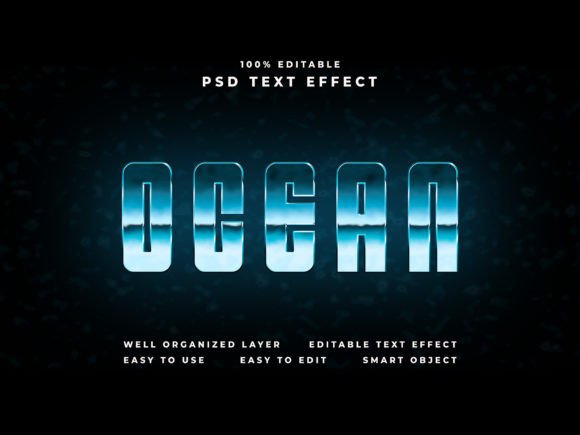
At its core, the Ocean Text Effect is a pre-built Photoshop template designed to simulate the look and feel of water, waves, and oceanic gradients applied to text or vector shapes. But calling it a simple filter would undersell what it actually does. The effect typically combines multiple layers of color blending, displacement mapping, light reflection, and texture overlay to create a convincing illusion that your letters are carved from or submerged in ocean water.
The real magic lies in the smart object workflow. Instead of manually stacking adjustment layers and clipping masks, you place your design into a dedicated smart object layer, and the template automatically applies the full ocean treatment. This means anyone — from a seasoned creative director to a small business owner designing their first Facebook cover — can produce a polished, cinematic result in minutes.
The resolution specs alone tell you this isn't a casual resource. With a 4000 x 6000 pixel canvas at 300 dpi, the output is crisp enough for large-format printing, while also being overkill for digital use — which is exactly the point. You can crop, resize, or repurpose the final file across platforms without losing quality.
Why Smart Object Editing Changes the Game
If you have ever spent an afternoon chasing layer styles, wondering why your drop shadow doesn't match your gradient, you already understand the frustration. Smart objects eliminate that pain almost entirely. The Ocean Text Effect relies on this Photoshop feature to keep the editing process both fast and non-destructive.
Here is how it typically works: you open the PSD file, locate the smart object layer (usually clearly labeled), double-click to open it, paste or type your text, save, and close. The main canvas updates instantly with the full ocean styling applied. That is it. No need to adjust blending modes, no guesswork about opacity, no trial-and-error with layer position.
This efficiency matters more than you might think. When you are producing multiple versions of a poster, tweaking a headline for a YouTube banner, or testing different logo variations for a client presentation, being able to swap content in under a minute keeps your creative momentum alive. You spend time refining the message, not wrestling with the software.
Endless Applications Across Media and Industries
The versatility of the Ocean Text Effect is one of its strongest selling points. Because the result is both highly stylized and broadly evocative, it fits comfortably into a wide range of projects.
Social Media and Digital Covers
A Facebook cover or YouTube banner needs to grab attention within a fraction of a second. Ocean-styled text naturally draws the eye because water imagery triggers an instinctive response. Whether you are promoting a travel vlog, a beachside event, a documentary about marine life, or even a wellness brand centered on calm and flow, this treatment communicates the theme before anyone reads a single word. The 4K resolution ensures your cover stays sharp across devices, from smartphones to ultrawide monitors.
Event Posters and Flyers
For concerts, festivals, surf competitions, environmental fundraisers, or summer product launches, the Ocean Text Effect adds a layer of polish that sets professional print materials apart from DIY efforts. The 300 dpi resolution means your flyer will look clean and vibrant whether it is printed at A4 or blown up to poster size. The included preview JPGs give you immediate mockups to share with stakeholders or clients before committing to a final print run.
Cinematic Titles and Video Intros
Film and video producers will appreciate how well the effect translates to title sequences. Ocean-themed typography works beautifully for documentaries, short films, music videos, and even feature-length projects where water plays a thematic role. Because the layered PSD is organized and editable, you can adapt the intensity of the effect — dialing it back for subtle titles or pushing it forward for dramatic, bold headings.
Logo Design and Branding
Maybe you are developing a brand identity for a surf shop, a seafood restaurant, a marine conservation nonprofit, or a coastal real estate agency. Applying the Ocean Text Effect to a logo mark or wordmark gives you a high-impact visual for initial concepts. While a final logo would likely be simplified for scalability, the effect is perfect for hero imagery on websites, launch campaigns, and social media profiles.
What's Inside the Package and Why It Matters
Knowing what you are getting before you download is part of making a smart purchasing decision. The Ocean Text Effect package is built around clarity and ease of use, and the included files reflect that philosophy.
- Photoshop PSD File — This is the main working file. It includes fully organized layers and folders, with everything labeled so you can find exactly what you need. Whether you want to tweak the color undertone, adjust the wave intensity, or swap out the background texture, you can do so without breaking the effect.
- Preview JPG Files — These give you a ready-made look at what your text will resemble, which is helpful for client approvals, portfolio presentations, or just seeing the possibilities before you open Photoshop.
- How to Use PSD Text Effect PDF — A step-by-step guide that walks you through the entire editing process. Even if you are relatively new to Photoshop, this document removes the guesswork. It covers opening the smart object, applying your text, and exporting your final design.
- Help Font.txt — Typography can make or break an effect. This file lists the recommended fonts used in the preview designs, along with suggestions for alternatives if you don't have the exact typeface installed. This small detail saves you from the frustration of a design looking flat because the font doesn't carry the styling well.
Organized Layers and Folders: A Practical Deep Dive
You have probably opened a PSD file before where layers are named "Layer 1," "Layer 2 copy 3," and "Group 1" — and immediately closed it again. The Ocean Text Effect avoids this headache entirely. The file structure is designed with the end user in mind.
Layers are grouped into logical folders — something like "Background," "Text Effect Base," "Reflection and Highlights," and "Color Grading." Each folder can be expanded or collapsed, and the key editing points are highlighted or color-coded. This organization matters because it gives you control. Maybe you want a warmer ocean tone for a tropical brand or a colder, stormier look for a documentary title. With the layers properly named and separated, you can adjust hue/saturation layers, gradient fills, or texture overlays without accidentally affecting other parts of the design.
For designers working in teams, this structure is also a communication tool. You can hand the file to a colleague or a junior designer with confidence that they will understand how it works without needing a lengthy briefing. That saves time and reduces the chance of errors.
Quality and Resolution: Built for Real Projects
One of the biggest disappointments in digital design assets is discovering that a beautiful preview image was created at a tiny resolution that falls apart when you try to use it. The Ocean Text Effect avoids this pitfall with a 4000 x 6000 pixel canvas at 300 DPI. That is true 4K quality, and it gives you room to work.
Why does this matter? If you need to place the text on a billboard, a trade show banner, or a large window display, the resolution holds up. If you are using the design digitally, you can crop aggressively or add surrounding imagery without the text becoming pixelated. And because the PSD is editable, you can scale the text within reason while keeping the underlying ocean texture crisp.
The 300 DPI spec is particularly important for print designers. It means the file is press-ready out of the box. You do not need to convert or resample it for most commercial printing workflows. That alone can save hours of prepress adjustments.
Compatibility and Workflow Integration
The template is built for Photoshop CC, which means it is compatible with the latest features and performance improvements Adobe has rolled out over recent versions. If you are using a recent release of Photoshop, you will have no trouble opening, editing, and saving the file. The smart object functionality is fully supported, and the layer organization takes advantage of modern Photoshop capabilities like folder nesting and color labels.
For creative professionals who work across the Adobe ecosystem, the output PSD can also be placed into Illustrator, InDesign, After Effects, or Premiere Pro via dynamic linking or simple import. This makes it a flexible asset for larger campaigns where the same ocean-themed typography needs to appear across print, video, and web deliverables.
Who Benefits Most from the Ocean Text Effect?
This resource is genuinely useful across a broad spectrum of users. A freelance graphic designer can add it to their asset library for client work, saving time on projects that need a watery aesthetic. A small business owner can create professional-looking promotional materials without hiring a designer. A content creator or YouTuber can produce channel art that stands out in a crowded feed. A marketing team can quickly generate on-brand visuals for a summer campaign or a product launch tied to ocean themes.
The common thread is the desire for high-quality results without an unreasonable time investment. The Ocean Text Effect delivers on that promise by shifting the heavy lifting to a well-built template, leaving you free to focus on the creative decisions that truly matter — the message, the composition, and the overall impact of your design.
In a world where visuals are consumed faster than ever, having a reliable, fast, and beautiful way to present text can be the difference between someone stopping to read your message or scrolling past it. The Ocean Text Effect gives you that advantage with minimal friction, and that is a combination worth having in your creative arsenal.